
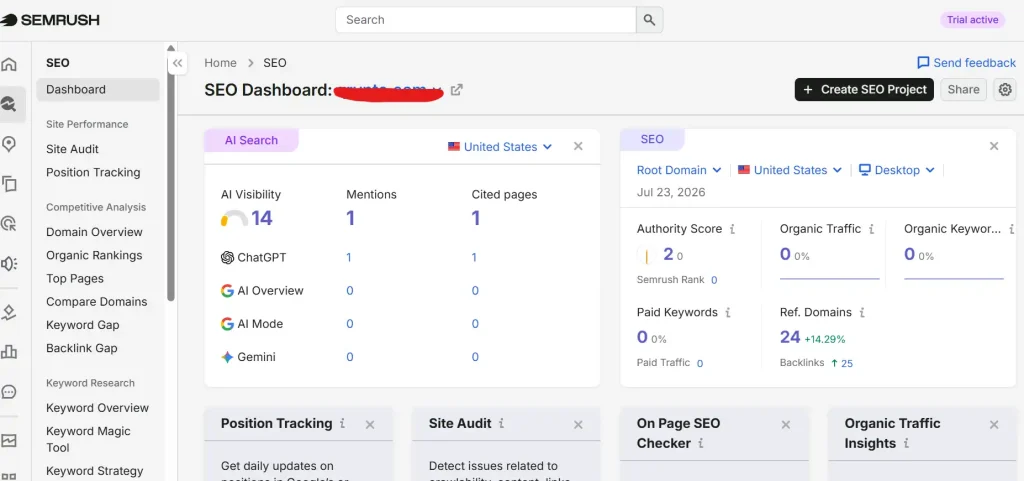
If you've spent any time researching SEO tools, you've probably come across Semrush. It's consistently recommended by SEO professionals, agencies, bloggers, and digital marketers for keyword research, competitor analysis, technical SEO, backlink auditing, content optimization, and rank tracking.
But with several SEO platforms available today, one important question remains:
Is Semrush actually worth the investment, or is it simply one of the most well-known names in the industry?
I've asked myself the same question over the years while working on SEO campaigns for local businesses, ecommerce stores, B2B companies, and international websites. Like many SEO professionals, I've tested different tools depending on the project, budget, and objectives. While every platform has its strengths, Semrush has consistently been one of the tools I rely on most for daily SEO work.
In this review, I'm not repeating the feature list from the official website. Instead, I'll explain how I use Semrush in real projects, where it performs exceptionally well, where it has limitations, and whether it's the right choice for different types of users.
Whether you're:
- A freelancer managing multiple clients
- A small business owner handling your own website
- An ecommerce store looking to grow organic traffic
- A local business focused on Google visibility
- A digital marketing agency managing large campaigns
- A blogger or content creator building long-term traffic
this review will help you decide if Semrush is the right investment.
Throughout this guide, I'll cover its core features—including keyword research, competitor analysis, backlink analytics, technical SEO audits, rank tracking, local SEO tools, and content optimization—with practical examples and insights from real-world SEO workflows.
I'll also compare Semrush with other popular SEO tools, discuss its pricing, share the pros and cons, and explain which users are most likely to benefit from it.
By the end of this review, you should have a clear understanding of:
- What Semrush does best.
- Where it falls short.
- Whether it offers good value for your needs.
- Which subscription plan makes the most sense.
- And whether it's a worthwhile investment for your SEO strategy in 2026.
Quick Verdict
Rating: ⭐⭐⭐⭐⭐ (4.8/5)
Best For: SEO professionals, agencies, freelancers, ecommerce businesses, and content marketers who need an all-in-one SEO platform.
Not Ideal For: Hobby bloggers or users with very limited SEO needs who only require basic keyword research.
Bottom Line: If you're serious about improving your organic search performance and want a platform that combines keyword research, competitor analysis, technical SEO, backlink insights, rank tracking, and content optimization, Semrush is one of the strongest all-in-one solutions available today.

What Is Semrush?
Semrush is an all-in-one digital marketing platform that helps businesses improve their online visibility through search engine optimization (SEO), content marketing, competitor research, paid advertising insights, social media management, and local marketing tools. Since its launch in 2008, it has evolved from a keyword research tool into one of the most comprehensive SEO platforms available today.
Unlike free SEO tools that focus on a single task, Semrush combines multiple workflows into one dashboard. Instead of switching between separate tools for keyword research, backlink analysis, rank tracking, technical audits, and competitor research, users can manage nearly every stage of an SEO campaign from one place.
This all-in-one approach is one of the main reasons why Semrush is widely used by SEO professionals, agencies, ecommerce brands, content teams, and in-house marketing departments.
More Than Just a Keyword Research Tool
Many people discover Semrush because they need keyword ideas. While keyword research is one of its strongest features, the platform offers much more.
With Semrush, you can:
- Discover high-value keywords based on search volume, keyword difficulty, and search intent.
- Analyze competitors' organic traffic, top-performing pages, and ranking keywords.
- Perform technical SEO audits to identify crawl errors, broken links, duplicate content, and Core Web Vitals issues.
- Monitor keyword rankings across desktop, mobile, and local search results.
- Analyze backlink profiles and identify new link-building opportunities.
- Optimize website content using on-page SEO recommendations.
- Track local business visibility and manage online listings.
- Research paid advertising strategies and competitor PPC campaigns.
- Generate SEO reports for clients or internal stakeholders.
For businesses managing multiple websites or campaigns, having these capabilities in one platform can simplify day-to-day SEO operations.
Why So Many SEO Professionals Recommend Semrush
SEO is no longer just about finding keywords and building backlinks. Modern SEO requires understanding user intent, monitoring competitors, maintaining technical website health, creating high-quality content, and measuring performance over time.
Semrush supports these activities through integrated tools that work together. For example, you might discover a keyword in the Keyword Magic Tool, analyze its competition using Organic Research, review ranking pages, audit your website for technical issues, optimize the content with On Page SEO Checker, and then monitor rankings using Position Tracking—all within the same platform.
This connected workflow reduces the need to export data between different tools and helps marketers make faster, more informed decisions.
My Experience Using Semrush
I've used Semrush across a variety of SEO projects, including local SEO campaigns, ecommerce websites, service-based businesses, and international websites targeting multiple markets.
One aspect I appreciate is how quickly it provides actionable data. Whether I'm researching new keyword opportunities, comparing competitor performance, or auditing a website before starting an SEO campaign, Semrush usually gives me the information I need in a matter of minutes.
For example, when beginning a new SEO project, my typical workflow includes:
- Running a Site Audit to identify technical issues.
- Reviewing competitors' top-performing pages using Organic Research.
- Building keyword clusters with Keyword Magic Tool.
- Tracking priority keywords using Position Tracking.
- Monitoring backlink growth throughout the campaign.
Having these tasks connected inside one platform saves time compared to using multiple standalone tools.
That said, no SEO tool is perfect. Some reports have usage limits depending on your subscription plan, and beginners may initially find the interface overwhelming because of the number of available features. I'll discuss these limitations later in this review.
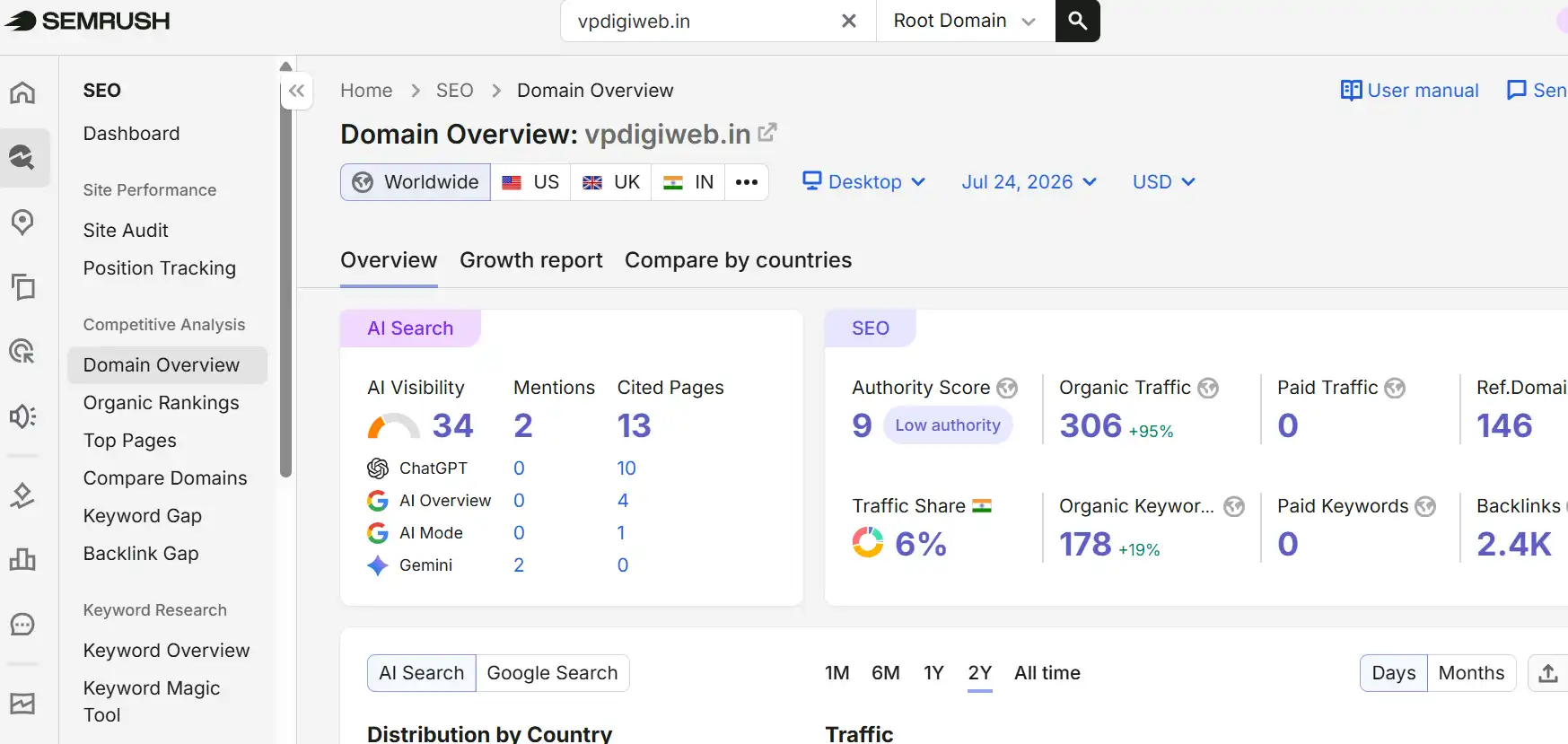
Who Should Use Semrush?
Semrush is designed for a broad range of users, but some will benefit more than others.
SEO Professionals
If SEO is part of your daily work, Semrush can significantly reduce the time spent on research, technical analysis, and reporting. The combination of keyword research, backlink analysis, and technical auditing makes it a practical choice for ongoing optimization.
Freelancers
Freelance SEO consultants often need to manage multiple clients with different goals. Semrush provides a centralized workspace for audits, keyword tracking, competitor analysis, and reporting, helping freelancers stay organized and deliver measurable results.
Digital Marketing Agencies
Agencies managing dozens of websites need scalable workflows. Features like Projects, Position Tracking, Site Audit, and scheduled reporting make Semrush particularly valuable for client management.
Ecommerce Businesses
Online stores can use Semrush to discover product-focused keywords, analyze category page opportunities, monitor competitors, and identify technical issues that affect organic visibility.
Content Marketers and Bloggers
Content creators can use Semrush to identify topic clusters, analyze search intent, evaluate ranking difficulty, and optimize articles for better search performance.
Local Businesses
Businesses targeting specific cities or service areas can use Semrush to research local keywords, monitor rankings, evaluate competitors, and improve their local SEO strategy.
Who May Not Need Semrush?
While Semrush is powerful, it isn't the ideal solution for everyone.
You may not need a paid subscription if:
- You only publish a few blog posts each year.
- Your SEO needs are limited to occasional keyword research.
- You're just experimenting with SEO and have no immediate plans to invest in organic growth.
- Your budget is very limited, and free tools meet your current requirements.
In these situations, free tools like Google Search Console, Google Keyword Planner, and Google Trends can cover basic SEO tasks. However, as your website grows, you'll likely find yourself needing deeper insights into competitors, backlinks, rankings, and technical issues—areas where Semrush offers substantially more functionality.
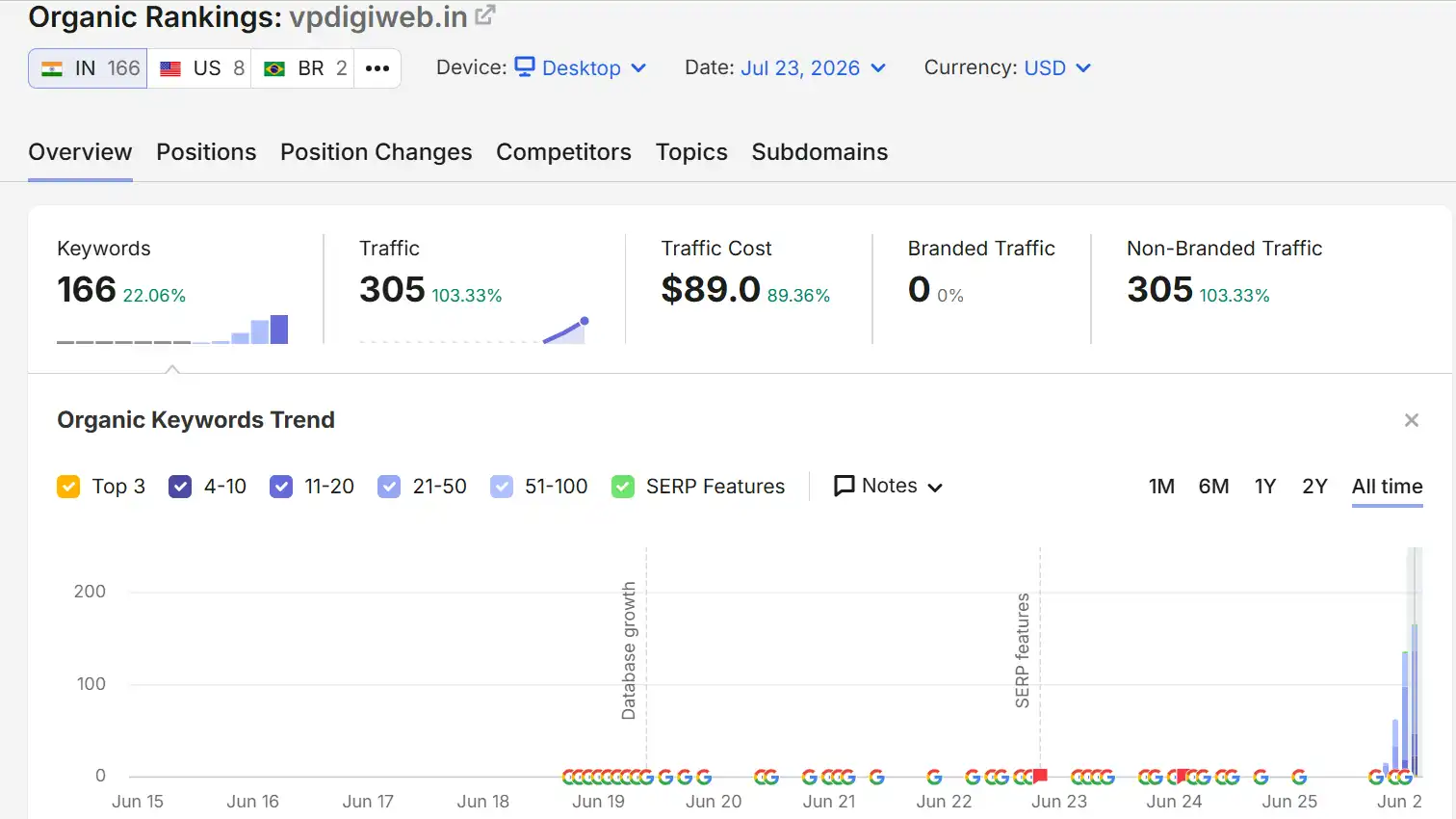
If you're looking for a single platform to manage keyword research, technical SEO, competitor analysis, backlink monitoring, content optimization, and rank tracking, Semrush is one of the most complete solutions available. While it has a learning curve and may be more than casual users need, its depth of features makes it a valuable investment for professionals and businesses that rely on organic search for growth. Try Semrush for free below.

Semrush Features Overview: What's Included in Your Subscription?
One of the biggest reasons SEO professionals choose Semrush is that it combines multiple marketing tools into a single platform. Instead of paying for separate software to perform keyword research, technical SEO audits, backlink analysis, competitor research, content optimization, and rank tracking, Semrush brings these workflows together under one dashboard.
This integrated approach can save time, improve collaboration, and reduce the need to switch between multiple tools throughout the day.
Whether you're optimizing a local business website, managing an ecommerce store, or handling SEO campaigns for multiple clients, Semrush provides dedicated tools for nearly every stage of the optimization process.
Before we dive into each feature individually, here's a quick overview of what you get with a Semrush subscription.
Semrush Feature Overview
| Feature | What It Helps You Do | Best For |
|---|---|---|
| Keyword Overview | Analyze keyword metrics and intent | SEO professionals, bloggers |
| Keyword Magic Tool | Discover thousands of keyword ideas | Content marketers |
| Organic Research | Analyze competitor rankings | Agencies, freelancers |
| Keyword Gap | Compare keywords with competitors | Competitive SEO |
| Backlink Analytics | Review backlink profiles | Link building |
| Backlink Gap | Find backlink opportunities | Outreach campaigns |
| Site Audit | Detect technical SEO issues | Website owners |
| Position Tracking | Monitor keyword rankings | Ongoing SEO campaigns |
| On Page SEO Checker | Improve page-level optimization | Content teams |
| SEO Writing Assistant | Optimize content before publishing | Writers and editors |
| Topic Research | Discover content ideas | Bloggers |
| Traffic Analytics | Estimate competitor traffic | Market research |
| Advertising Research | Analyze competitor PPC campaigns | Paid marketers |
| Listing Management | Manage local business listings | Local businesses |
| Social Toolkit | Schedule and monitor social media | Marketing teams |
| My Reports | Create white-label SEO reports | Agencies |
Author's Note: While Semrush includes dozens of tools, not every feature will be essential for every user. In my day-to-day SEO work, I regularly use Keyword Magic Tool, Organic Research, Site Audit, Position Tracking, Backlink Analytics, and On Page SEO Checker. These six tools alone provide enough insights to manage most SEO campaigns effectively.
Why an All-in-One SEO Platform Matters
If you've ever tried to manage SEO using several free tools, you've probably experienced the frustration of switching between tabs, exporting spreadsheets, and manually combining data.
For example, imagine you're creating a content strategy for a new client. You might need to:
- Research keyword opportunities.
- Check competitor rankings.
- Analyze backlink profiles.
- Audit the website for technical issues.
- Track target keywords over time.
- Measure improvements after publishing content.
With separate tools, each task requires a different platform. Semrush simplifies this workflow by keeping everything in one place, making it easier to connect insights and take action faster.
The Features I Use Most Often
Although Semrush offers a wide range of capabilities, there are a handful of tools I rely on consistently across client projects.
Keyword Magic Tool
This is usually where I begin any new SEO campaign. It helps uncover keyword opportunities, long-tail variations, question-based searches, and keyword clusters that support content planning.
For local SEO projects, I often use it to identify location-specific search terms. For ecommerce websites, it helps discover product-focused keywords with commercial intent.
Organic Research
Understanding what already works for your competitors can save hours of guesswork.
Organic Research reveals:
- Top-performing pages.
- Ranking keywords.
- Estimated organic traffic.
- Position changes over time.
Rather than starting from scratch, I use this data to identify proven opportunities and build a more informed SEO strategy.
Site Audit
Technical SEO issues often go unnoticed until they begin affecting rankings or user experience.
The Site Audit tool scans your website for problems such as:
- Broken internal links.
- Redirect chains.
- Missing meta descriptions.
- Duplicate content.
- Crawl errors.
- HTTPS implementation issues.
- Core Web Vitals concerns.
Running regular audits helps identify issues before they become larger problems.
Position Tracking
SEO isn't just about achieving rankings—it's about monitoring progress over time.
Position Tracking allows you to:
- Track target keywords daily.
- Compare desktop and mobile rankings.
- Monitor local search performance.
- Measure visibility trends.
This makes it easier to demonstrate the impact of ongoing SEO work to clients or internal stakeholders.
Backlink Analytics
Backlinks remain an important ranking signal, and understanding your link profile is essential.
Backlink Analytics provides insights into:
- Referring domains.
- Authority metrics.
- New and lost backlinks.
- Anchor text distribution.
- Competitor backlink profiles.
I often use this feature to identify potential outreach opportunities and evaluate competitors' link-building strategies.
On Page SEO Checker
Publishing content is only part of the process. Optimizing it for search engines is equally important.
On Page SEO Checker reviews your pages and suggests improvements based on current ranking competitors, including:
- Keyword usage.
- Content depth.
- Semantic keyword recommendations.
- Internal linking opportunities.
- Technical improvements.
While I don't apply every recommendation automatically, it serves as a useful second opinion during the optimization process.
Which Features Are Best for Different Users?
Freelancers
- Keyword Research
- Site Audit
- Position Tracking
- Backlink Analytics
- Reporting
Agencies
- Projects
- White-label Reports
- Position Tracking
- Site Audit
- Competitor Analysis
- Keyword Gap
Ecommerce Stores
- Product keyword research.
- Competitor category analysis.
- Backlink monitoring.
- Technical audits.
- Position tracking.
Local Businesses
- Local keyword research.
- Listing Management.
- Position Tracking.
- Competitor analysis.
- Site Audit.
Bloggers and Publishers
- Topic Research.
- Keyword Magic Tool.
- SEO Writing Assistant.
- Organic Research.
- Position Tracking.
Expert Insight
One mistake I see many beginners make is trying to use every feature Semrush offers from day one. In practice, you don't need to master the entire platform immediately. For most SEO projects, focusing on Keyword Magic Tool, Organic Research, Site Audit, Position Tracking, and Backlink Analytics will cover the majority of your day-to-day needs. As your experience grows, you can gradually explore the more advanced tools.
Keyword Research in Semrush – My Complete Workflow for Finding High-Value Keywords
If I had to choose just one feature that makes Semrush worth paying for, it would be its keyword research capabilities.
Whether you're writing blog posts, optimizing service pages, launching an ecommerce store, or planning a local SEO campaign, everything starts with choosing the right keywords.
Over the years, I've worked on websites ranging from local businesses to ecommerce stores and international SEO campaigns. One lesson has remained consistent:
Good keyword research doesn't just increase traffic—it attracts the right audience.
A page ranking #1 for an irrelevant keyword may generate thousands of visitors but very few inquiries or sales. On the other hand, a page ranking for a highly targeted keyword with commercial intent can produce qualified leads every month, even with modest search volume.
This is where Semrush stands out.
Instead of showing only search volume, it combines multiple SEO metrics—including search intent, keyword difficulty, CPC, trend data, SERP features, and competitor insights—to help you evaluate whether a keyword is worth targeting.
In my workflow, I rarely make keyword decisions based on a single metric. I look at the complete picture before deciding whether a keyword deserves its own landing page, blog article, or product page.
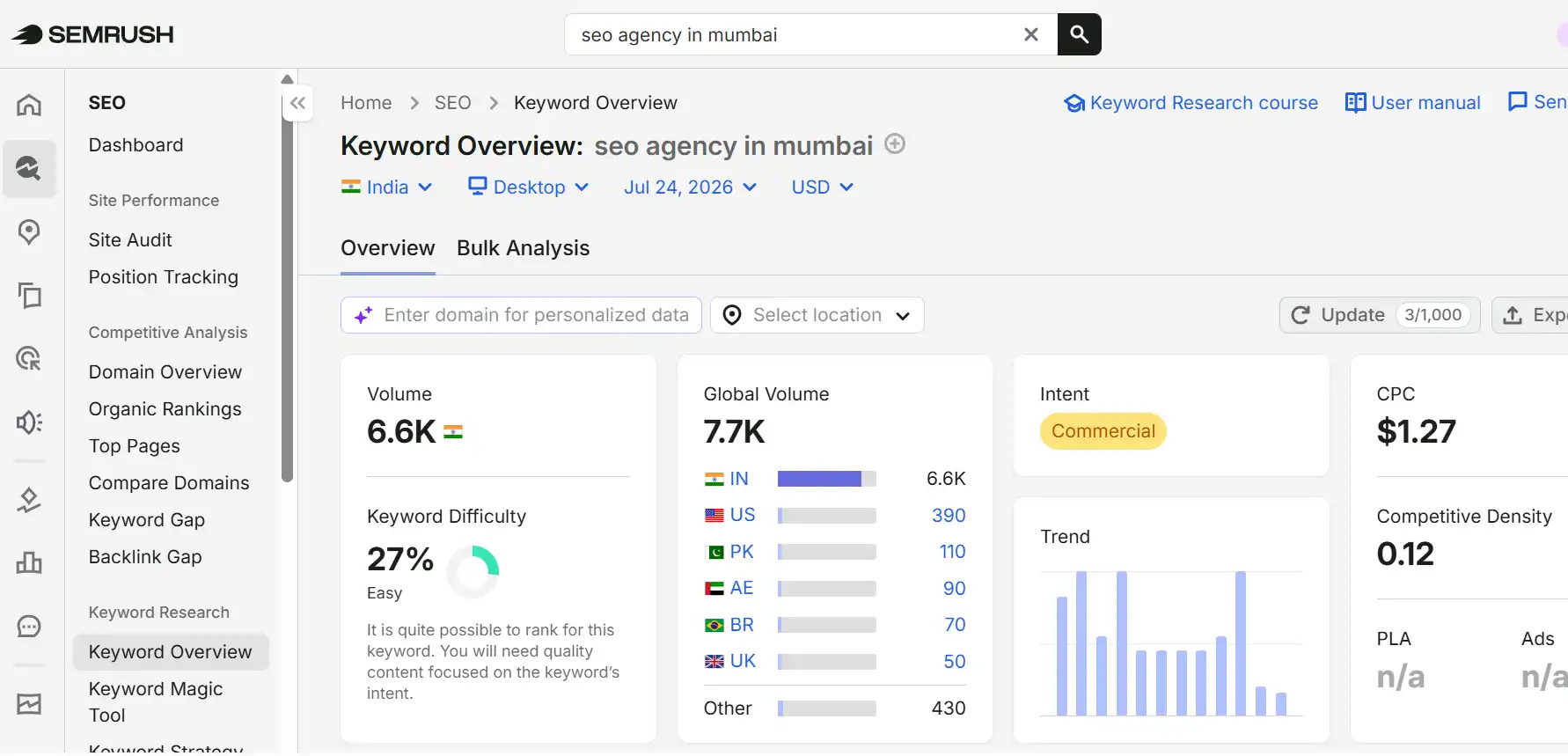
Trend Graph
Search volume alone doesn't reveal whether interest in a topic is increasing or declining.
The trend graph helps identify:
- Seasonal keywords
- Emerging topics
- Declining search interest
For example, ecommerce-related keywords often peak during festive shopping periods, while tax-related keywords surge before filing deadlines.
Recognizing these patterns helps you plan content calendars more effectively.
CPC (Cost Per Click)
Even if you focus solely on SEO, CPC can be a useful indicator.
Higher CPC values often suggest stronger commercial intent because advertisers are willing to pay more for those searches.
This doesn't guarantee conversions, but it can help prioritize keywords that may attract valuable traffic.
SERP Features
Another area I always review is the SERP Features section.
It indicates whether Google displays:
- Featured Snippets
- AI Overviews (where available)
- People Also Ask
- Local Pack
- Videos
- Shopping Results
- Images
Knowing which features appear for a keyword helps you tailor your content to better match the search results.
My Real Keyword Research Process
Rather than relying on a single report, I follow a structured workflow.
Step 1
Start with a broad seed keyword.
Example:
local seoStep 2
Open Keyword Overview.
Evaluate:
- Search Intent
- Keyword Difficulty
- Search Volume
- Trend
- CPC
Step 3
Open Keyword Magic Tool.
Generate hundreds or thousands of related keyword ideas.
Step 4
Apply filters.
For example:
- KD below 40 (or an appropriate threshold for your site's authority)
- Commercial intent where relevant
- Include long-tail variations
- Remove irrelevant keywords
Step 5
Group keywords into clusters.
Instead of creating one article per keyword, combine closely related keywords into comprehensive pages that satisfy the underlying search intent.
💡 My Experience
One of the biggest improvements in my SEO workflow came when I stopped choosing keywords based only on search volume.
Instead, I evaluate:
- Search intent
- Ranking competitors
- Content quality on Page 1
- Business relevance
- Internal linking opportunities
- Existing topical authority
This approach has consistently produced more meaningful traffic and stronger lead generation than chasing high-volume keywords alone.
Quick Takeaway
Keyword research is more than collecting search volumes. The best opportunities come from understanding intent, competition, business value, and content quality together.
Semrush brings these insights into one interface, making it easier to prioritize keywords that can drive qualified traffic instead of vanity metrics.
Want to research keywords the same way professional SEO consultants do? Try Semrush to analyze search intent, discover long-tail keyword opportunities, and build a data-driven content strategy.

Keyword Magic Tool – The Feature I Use Most for Content Planning
If Keyword Overview helps you evaluate a keyword, Keyword Magic Tool helps you build an entire content strategy.
In my opinion, this is one of Semrush's strongest features because it transforms a single keyword into thousands of related opportunities. Instead of guessing what your audience is searching for, you can explore a structured database of keyword variations, grouped by search intent and topic relevance.
Whether you're planning a blog, creating service pages, or expanding an ecommerce category, Keyword Magic Tool helps you move beyond isolated keywords and build topical authority.
For example, let's say your seed keyword is:
local seo
Within seconds, Semrush generates related searches such as:
- local seo services
- local seo agency
- local seo company
- local seo checklist
- local seo audit
- local seo strategy
- local seo pricing
- local seo tools
- local seo for small businesses
- local seo ranking factors
Instead of writing ten disconnected articles, you can organize these keywords into logical clusters that support a stronger internal linking structure and align with user intent.
Why Keyword Magic Tool Is Different
Many keyword research tools simply provide a long list of related keywords.
Semrush goes a step further by organizing those keywords into topic-based groups. This makes it easier to identify clusters of related searches rather than treating every keyword as a separate opportunity.
For example, when researching "local SEO," you might see groups related to:
- Services
- Pricing
- Tools
- Strategy
- Ranking Factors
- Checklist
- Google Business Profile
- Citations
This organization saves time and helps you plan content around broader topics instead of individual keywords.
My Workflow for Finding Low-Competition Keywords
One of the most common questions I receive is:
"How do you find keywords that are easier to rank for?"
While there isn't a universal formula, I follow a structured process that balances opportunity with realism.
Step 1: Start Broad
Begin with a broad seed keyword that describes your service or niche.
Examples:
- SEO services
- Ecommerce SEO
- Local SEO
- Technical SEO
Step 2: Apply Filters
Keyword Magic Tool includes filters that help narrow down large keyword lists.
I typically review:
- Lower Keyword Difficulty (relative to the website's authority)
- Clear search intent
- Relevant search volume
- Long-tail keyword variations
- Questions people are asking
These filters help surface keywords that are more likely to produce meaningful traffic.
Long-Tail Keywords: Where I Find the Best Opportunities
Many website owners focus exclusively on high-volume keywords.
In practice, some of the best opportunities come from long-tail keywords because they often reflect more specific user needs.
For example:
| Broad Keyword | Long-Tail Variation |
|---|---|
| SEO | Affordable SEO company in India |
| Local SEO | Local SEO services for dentists |
| Ecommerce SEO | Shopify SEO services for fashion stores |
| Technical SEO | Technical SEO audit checklist for WordPress |
These longer phrases may have lower search volumes, but they often attract users with clearer intent, making them valuable for lead generation.
Rather than targeting dozens of unrelated broad keywords, I prefer building comprehensive pages around well-defined topics supported by relevant long-tail variations.
Question Keywords
Another useful feature inside Keyword Magic Tool is the ability to filter keywords by Questions.
This reveals the actual questions users are typing into search engines.
Examples include:
- What is local SEO?
- How much does local SEO cost?
- Why is local SEO important?
- How long does local SEO take?
- Is local SEO worth it?
These questions are useful for:
- FAQ sections
- Supporting blog articles
- Featured snippet opportunities
- People Also Ask optimization
- AI search optimization
Including these questions naturally within your content can improve topical coverage and make your pages more helpful.
Creating Keyword Clusters Instead of Individual Articles
One mistake I frequently see is creating a separate page for every keyword variation.
For example:
- Local SEO
- Local SEO Services
- Local SEO Company
- Local SEO Agency
In many cases, these keywords share similar search intent. Rather than producing thin pages, I recommend grouping closely related terms into one comprehensive resource that addresses the topic in depth.
This approach helps:
- Improve topical authority.
- Reduce keyword cannibalization.
- Strengthen internal linking.
- Better satisfy user intent.
Keyword Magic Tool makes this process easier by grouping related keywords and helping you identify natural content clusters.
My Practical Advice
Keyword research tools provide data, but they don't replace critical thinking.
When evaluating keywords, I ask myself:
- Does this keyword match what my audience is looking for?
- Can I create something genuinely better than the current top-ranking pages?
- Does it fit naturally within my website's topical structure?
- Will ranking for this keyword support my business goals?
Answering these questions helps prioritize opportunities that are both achievable and valuable.
📦 Key Takeaways
- Keyword Magic Tool expands one idea into thousands of related opportunities.
- Topic grouping supports stronger content planning.
- Long-tail keywords often provide more targeted traffic.
- Question-based keywords can improve FAQ sections and search visibility.
- Clustering related keywords helps avoid cannibalization and build topical authority.
Real Keyword Research Workflow – How I Use Semrush to Build SEO Strategies
One of the biggest misconceptions about keyword research is that SEO success comes from finding the highest search volume keywords.
In reality, successful SEO campaigns are built around understanding user intent, evaluating competition, and creating content that solves specific problems. Search volume is only one part of the decision-making process.
When I start working on a new website, I don't immediately begin writing content. Instead, I spend time understanding the market, identifying competitors, and building a structured keyword strategy that supports long-term growth.
Semrush plays a central role in that process.
Below is the workflow I typically follow before publishing a single page.
Step 1 – Understand the Business Before Searching Keywords
Before opening any keyword tool, I ask a few basic questions:
- What products or services does the business actually sell?
- Which services generate the highest revenue?
- Which locations are being targeted?
- Who are the ideal customers?
- What problems are customers trying to solve?
- Which competitors dominate the search results?
Without these answers, even the best keyword research tool won't produce a useful strategy.
For example, imagine two businesses offering SEO services:
Business A
Targets startups across India.
Business B
Targets luxury real estate companies in Dubai.
Although both provide SEO services, their keyword strategies should be completely different because their audiences, budgets, and search intent differ.
Pro Tip: Keyword research should always begin with business goals—not search volume.
Step 2 – Analyze the Current Search Results
Before targeting any keyword, I review Google's first page.
Rather than asking:
"Can I rank?"
I ask:
"Why are these pages ranking?"
I look for patterns such as:
- Are the results blog posts or service pages?
- Are large brands dominating the SERP?
- Does Google show local results?
- Are AI Overviews or Featured Snippets present?
- Do the top pages answer the search intent completely?
If every result is a product page, publishing a blog article may not satisfy user intent.
Matching search intent is often more important than adding extra words or keywords.
Step 3 – Study Competitors Before Creating Content
One feature I use regularly is Organic Research.
Instead of guessing which keywords matter, I examine what is already generating traffic for successful competitors.
When reviewing a competitor, I focus on:
- Their highest-traffic pages.
- Keywords ranking in positions 4–20 (potential opportunities).
- Recently improved rankings.
- Pages attracting backlinks.
- Content gaps.
This process often reveals opportunities that traditional keyword brainstorming would miss.
Step 4 – Build Keyword Clusters
Years ago, many SEO strategies involved creating one page for every keyword variation.
Today, search engines understand related terms and user intent much better.
Instead of publishing:
- Local SEO
- Local SEO Services
- Local SEO Company
- Local SEO Agency
- Affordable Local SEO
I prefer creating one comprehensive resource that naturally covers these closely related searches.
Semrush makes this easier by revealing semantically related keywords that belong together.
For example:
Main Topic
Local SEO Services
Supporting keywords:
- local seo company
- affordable local seo
- local seo packages
- local seo expert
- local seo consultant
- local search optimization
Rather than competing with yourself through multiple similar pages, this approach builds a stronger topical signal.
Step 5 – Prioritize Based on Business Value
This is where I believe many SEO strategies fail.
Some keywords generate impressive traffic but little commercial value.
Others attract fewer visitors but produce significantly better leads.
For example:
| Keyword | Monthly Searches | Lead Potential |
|---|---|---|
| SEO | 90,000 | Low |
| SEO Services | 5,400 | High |
| SEO Company in Surat | 300 | Very High |
| Hire SEO Consultant | 250 | Very High |
Instead of chasing the biggest numbers, I prioritize keywords that align with business objectives and have a realistic chance of converting visitors into customers.
A Common Mistake I See
Many beginners export thousands of keywords into a spreadsheet and assume the research is complete.
In reality, keyword research only becomes valuable when you decide:
- Which keywords deserve their own page.
- Which keywords belong together.
- Which topics support your business goals.
- Which opportunities are achievable.
Semrush provides the data—but strategy comes from interpreting that data effectively.
My Practical Workflow
Whenever I start a new SEO project, my process typically looks like this:
Business Discovery
        ↓
Seed Keywords
        ↓
Keyword Overview
        ↓
Keyword Magic Tool
        ↓
Competitor Analysis
        ↓
Keyword Clustering
        ↓
Content Strategy
        ↓
On-Page Optimization
        ↓
Rank Tracking
💡 Original Graphic Recommendation
Instead of a plain text flow, create this as a branded diagram using your VP DigiWeb colors. It's an original visual asset that can earn backlinks and improve engagement.
📦 Key Takeaways
- Keyword research begins with understanding the business, not the tool.
- Search intent is more valuable than raw search volume.
- Competitor analysis uncovers proven opportunities.
- Grouping related keywords creates stronger topical authority.
- Business value should guide keyword prioritization.
- Semrush supports the research process, but successful SEO still requires informed decision-making.
Ready to build a keyword strategy based on data instead of guesswork? Semrush gives you the tools to research keywords, analyze competitors, organize content clusters, and monitor performance from one platform.

Reviewed by: Vicky Patel – SEO Specialist & Founder of VP DigiWeb with 9+ years of experience in SEO and digital marketing.